
What is being matched?
A whole image, a stable fingerprint, a local feature, an object, text, a face, or some combination of these signals.
Understand how image search indexes, fingerprints, crops, URLs, and visual similarity work before interpreting a result.
9 focused guides in this learning path
Browse all topics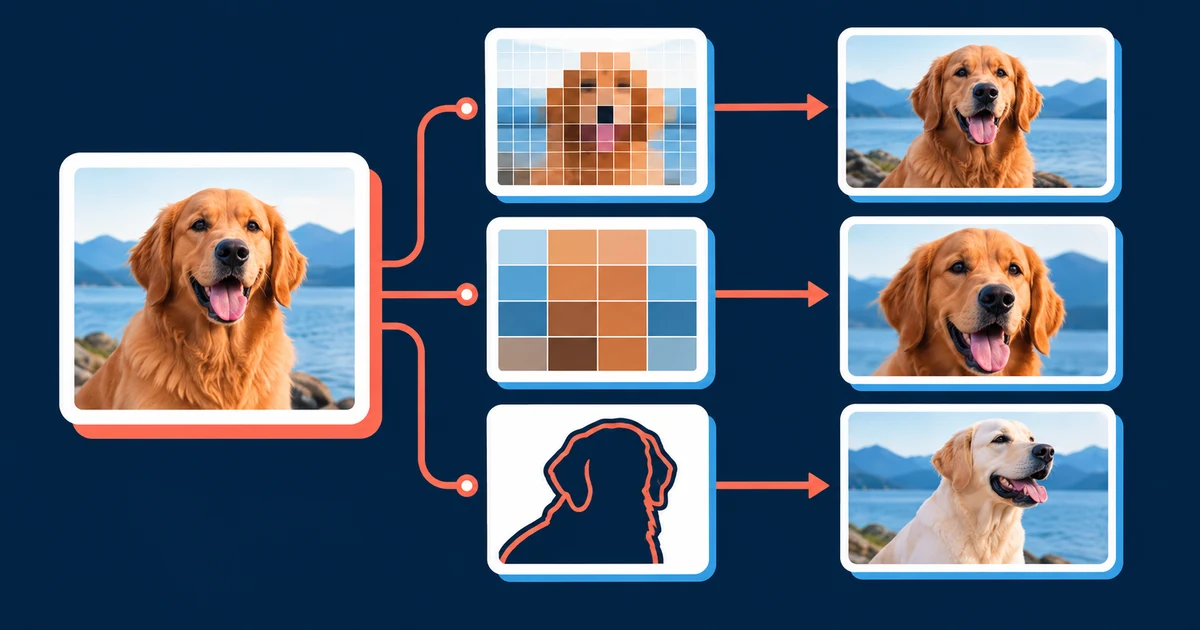
Start here when you need to choose a search method, improve a weak query, or understand why two engines return different evidence.
A whole image, a stable fingerprint, a local feature, an object, text, a face, or some combination of these signals.
Each provider searches its own index. No result means no useful match was returned from that index for that query.
A match can show visual reuse or similarity. It cannot establish ownership, identity, intent, or first publication by itself.
The engine does not search every image on the internet in real time. It analyzes the submitted image, creates one or more machine-readable representations, and compares those representations with images already known to its index. Coverage, crawl timing, matching thresholds, and ranking rules therefore shape every result set.
Exact-copy systems are strongest when the question is where the same visual file or a modified version appears. Object-oriented systems are better when the question is what product, landmark, plant, or visual concept is shown. The face search and recognition workflow focuses on facial features, while the image provenance workflow tests whether a candidate page supports a source claim.
Label each query before comparing results. If the detail crop finds a new source, you know which visual evidence made the difference. This is more informative than repeatedly changing several properties at once.
Classify each useful result as a direct duplicate, modified copy, same subject in another image, or broad visual analogy. Then inspect the surrounding page. A thumbnail alone cannot tell you who published the image, when it appeared, whether the caption is accurate, or whether the page has permission to use it.
Inspect an image, prepare a stronger query, and search the full frame or a focused crop.
Understand how image search indexes, fingerprints, crops, URLs, and visual similarity work before interpreting a result.
Learn what reverse image search can establish, what it cannot prove, and how different matching systems complement one another.
Estimated reading time: 8 minutes.
A mobile workflow for full-image searches, crops, screenshots, and privacy checks on iPhone and Android.
Estimated reading time: 7 minutes.
A task-based matrix for selecting complementary engines instead of assuming one index covers the whole web.
Estimated reading time: 8 minutes.
Prepare better queries without altering the original evidence or creating false detail through aggressive enhancement.
Estimated reading time: 6 minutes.
Use a zero-result diagnostic matrix to determine whether the problem is coverage, framing, quality, or the wrong search method.
Estimated reading time: 8 minutes.
A decision framework for choosing the image input that preserves the strongest evidence and exposes the least unnecessary data.
Estimated reading time: 7 minutes.
A match-type matrix for deciding whether you need the same file, a changed copy, the same subject, or a visually related concept.
Estimated reading time: 8 minutes.
An evidence guide for turning image matches into careful findings without treating a search result as proof of identity or ownership.
Estimated reading time: 9 minutes.
A practical classification system for separating exact files, visual copies, partial matches, and related subjects before drawing a conclusion.
Estimated reading time: 9 minutes.